The Home Office
Many home offices in the Tri-Cities of Tennsesse are compromises. They are a spare bedroom, a corner of the basement, or a bonus room that has a desk put in it as an afterthought. This is a fundamental mistake.
When you build a custom home, you have a rare opportunity. You can stop fighting your space and instead engineer a space that works precisely for you. A “one-size-fits-all” home office layout just leads to frustration, distraction, and inefficiency. The needs of a graphic designer are completely different from the needs of a therapist, and the space should reflect that. A well-designed home office is a tool, not just a room.
This article moves beyond paint colors and desk chairs. We will look at how to design a home office based on your profession from an engineer’s and a builder’s point of view. We will focus on the things inside the walls: the infrastructure, the layout, and the custom-built elements that define a truly productive and professional home office. This is about planning with competence and precision from the very start.
The Foundation: What Every Professional Home Office Must Get Right
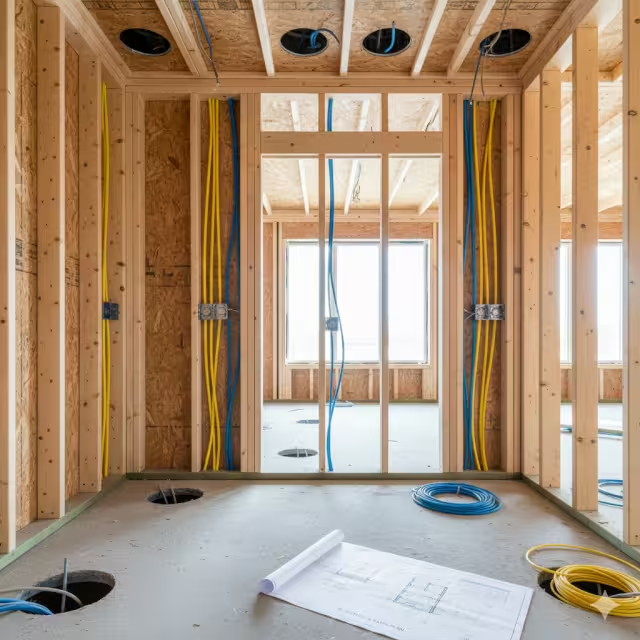
Before we design for your specific job, we have to lay the groundwork. A successful home office, regardless of your profession, is built on a strong foundation. A weak foundation means you will always be working around problems. When planning a new custom build, the aspects of the foundation are the non-negotiable items we must get right before the drywall goes up. You cannot easily fix these later.
Location, Layout, and Workflow
The first question to ask is: “Who uses this home office, and how?” The answer determines its location.
- Privacy vs. Accessibility: Where your home office is located in the house is your first major decision. If you are a writer or a programmer, you need maximum privacy. Your home office should be placed at the end of a hallway, in a quiet basement corner, or on a separate floor from the main living areas. You want to be isolated from family foot traffic and household noise. But, if you are a consultant or therapist who sees clients, you need the opposite. Your home office needs to be immediately accessible from the front door, or even have its own separate entrance. This prevents clients from walking through your private living space, which is critical for both professionalism and family security.
- The “Work Triangle”: This is a concept borrowed from kitchen design, and it applies perfectly to a home office. Your workflow moves between three main zones:
- The Primary Zone: Your main desk and chair.
- The Secondary Zone: Your primary storage (file cabinets, bookshelves, etc.).
- The Tertiary Zone: Your equipment (printer, scanner, network hardware).
The layout of your home office must make the path between these three points short and logical. You should not have to walk across the room to get a file or grab a printout. In a well-planned home office, you can often access all three zones just by swiveling your chair.
The Infrastructure: The “In-Wall” Essentials
The infrastructure or in-wall essentials is what separates a truly custom home office from a standard bedroom. Getting the infrastructure right is the core of a competent build.
- Electrical (Competence): A home office is a high-demand room. Your computer, multiple monitors, printers, chargers, and lighting all draw a lot of power. The biggest mistake is to have your home office share a circuit with other rooms. You do not want your computer monitors to flicker every time someone starts the microwave.When we build, it is good practice that the home office gets its own dedicated 20-amp circuit. Think of it as a private, multi-lane highway for your power. It ensures you have clean, consistent electricity, which protects your sensitive electronics and prevents tripped breakers. We also plan the outlet locations with precision. Instead of one or two standard duplex (two-plug) outlets, it is best to install quad (four-plug) outlets. Generally, they are placed at desk height to avoid a nest of cords on the floor. For a “floating” desk in the middle of the room, we install floor outlets before the foundation or flooring goes in. This is planning with integrity
- Data (Integrity): Do not rely on Wi-Fi for your profession. Wi-Fi is for convenience. A hard-wired connection is for reliability. For any serious professional, this is not negotiable. Video calls that freeze, or large file transfers that fail, are unprofessional.During the build, we run Cat 6 Ethernet cables directly from your home’s central network hub to a dedicated data port in the wall of your home office. This gives you the fastest, most stable, and most secure internet connection possible. We can even run extra “smurf tubes” or conduits in the wall, which are empty pipes that allow you to easily pull new types of cables in the future without tearing open the walls. A good home office is future-proof
- Lighting (Precision): A single ceiling light is the worst possible lighting for a home office. It creates shadows, causes headaches, and casts a harsh glare on your computer screen. A professional home office uses a layered lighting system.
- Ambient Light: This is the general light for the room. It can come from a modern ceiling fixture or, even better, recessed can lights that provide even, diffused light across the entire home office.
- Task Light: This is focused light on your main work surface. This can be a high-quality desk lamp, but in a custom build, we often use under-cabinet lighting. If you have built-in shelves above your desk, lights mounted underneath will perfectly illuminate your desktop without adding clutter.
- Accent Light: This is for a modern, specific need: video calls. Two wall sconces placed on either side of your computer monitor, or a soft light bar above it, will light your face evenly. This prevents you from looking like a silhouette against a bright window or having harsh shadows from an overhead light
Ergonomics as a Built-In Feature
Ergonomics is about making the space fit you, not forcing your body to fit the space. A good chair is a great start, but a custom home office lets us build ergonomics right into the structure.
- Custom Desk Height: With my carpentry background, this is a simple but powerful customization. A standard desk is 29 or 30 inches high. But what if you are taller or shorter? We can build a custom desk or countertop at the exact height that is comfortable for you, allowing your arms to rest at a perfect 90-degree angle. We can even build a split-level desk, with one section for sitting and a permanent, 42-inch-high section for standing.
- Monitor Placement: Heavy monitors and multi-screen setups need strong support. Standard monitor arms clamp onto the back of a desk, which can be unstable. In a custom home office, we can add extra blocking (solid wood) inside the wall before the drywall goes up. This gives you a rock-solid mounting point for heavy-duty, wall-mounted monitor arms. This clears your desk of clutter and lets you position your screens at the perfect eye level, reducing neck strain.
A proper home office is an engineered system. Once this foundation is in place, we can then specialize the design for your exact profession.
The Professional Blueprints: Designing for Your Specific Workflow
Now we get to the specific applications. Once the foundation is set, the layout, storage, and features of your home office must be tailored to your daily work. Here is how to approach the design for four very different types of professionals.
A. The Technician: (Programmer, Engineer, Analyst, IT)
- Primary Need: Deep, uninterrupted focus, management of complex technology, and extreme, long-hour ergonomics.
- Tri-Cities TN Build Plan:
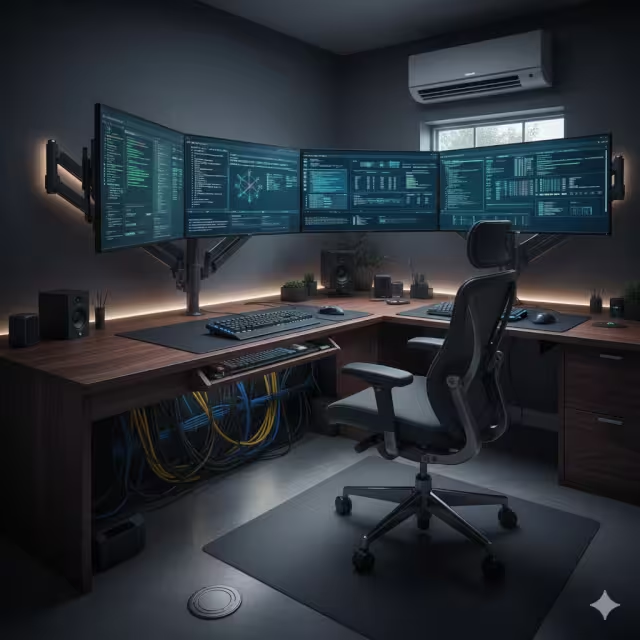
- Layout: The goal for this home office is to create a “cockpit.” All critical tools must be within arm’s reach. We achieve this with custom-built “L” or “U” shaped desks. This wraps the workspace around you, providing a huge surface area for multiple monitors, keyboards, and test devices.
- Tech (Cable Management): This type of home office has more wires than any other. A mess of cables is distracting and unprofessional. Precision is key. We build in deep cable management systems. This includes large grommets (holes) cut directly into the desktop, which lead to hidden troughs or raceways mounted underneath. All wires are channeled invisibly to the power and data ports.
- Environment (HVAC): High-end computers, servers, and multiple monitors generate a lot of heat. A standard home office can become uncomfortably warm, making the main house HVAC work overtime. The precise solution is a dedicated HVAC zone or a mini-split system. This gives you direct, independent control over the temperature of just your home office, keeping you and your equipment cool and efficient.
- Lighting and Glare: Screen glare is the enemy of focus. We plan window placement carefully. The best layout places windows adjacent to your monitors (to your side), not directly behind them (which creates glare) or in front of them (which makes your screen hard to read). We pair this with the layered lighting system, relying mostly on indirect ambient and task lighting.
B. The Creative: (Designer, Artist, Writer)
- Primary Need: Inspiration, “sprawl space” to spread out projects, and highly specialized storage for different materials.
- Tri-Cities TN Build Plan:
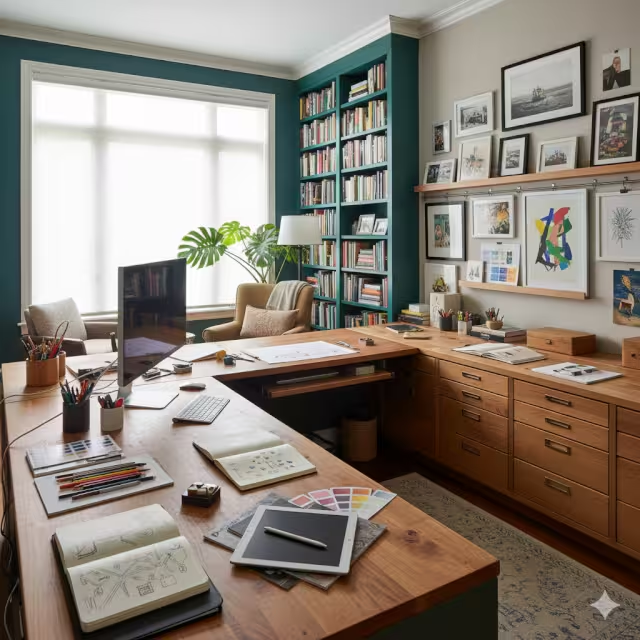
- Layout (Dual Zones): Creatives often work in two modes: digital and analog. A writer needs a quiet computer space and a separate armchair for reading. A designer needs a “clean” desk for their computer and a “dirty” desk for sketching, cutting, or working with physical samples. We design the home office layout with two distinct zones to accommodate this.
- Light (Natural Light): While the Technician avoids glare, the Creative thrives on natural light. We can orient this home office to maximize it. For artists and designers, North-facing windows are ideal. They provide consistent, indirect light all day without the harsh shadows or color shifts of direct sun. We can use larger windows or even skylights to flood the space.
- Storage (Custom Carpentry): This is where my carpentry certificate is most useful. The storage needs for this home office are unique.
- For Writers: Floor-to-ceiling built-in bookshelves are essential. They provide storage, inspiration, and also act as excellent sound dampening.
- For Artists/Designers: We build flat-file cabinets. These are units with many wide, shallow drawers, perfect for storing large-format paper, prints, or fabric swatches without bending or damage. We also design deep drawers for paint, bolts of fabric, or camera equipment, and “gallery walls” with built-in picture rail molding to easily hang and change out inspiring artwork.
C. The Client-Facing Professional: (Therapist, Consultant, Financial Advisor)
- Primary Need: Absolute acoustic privacy, a sense of security and comfort, and a professional, non-confrontational atmosphere.
- Tri-Cities TN Build Plan:
- Acoustics (The #1 Priority): This is an engineering problem, and it is the most critical part of this home office design. Confidentiality is paramount. You cannot have private conversations leaking into the rest of the house, or family noise leaking in.
- Solid Core Doors: We start with a heavy, solid core door, not a standard hollow one. This is the first and most important barrier to sound.
- Sound Insulation: We use high-density, sound-dampening insulation (like Roxul Rockboard) in all the interior walls of the home office, as well as the ceiling. This absorbs sound instead of letting it pass through.
- Acoustic Drywall: We can use a special type of drywall that is denser and layered to further block noise.
- Staggered Stud Walls (The Ultimate Solution): For maximum privacy, we can build a special wall. Instead of a single row of 2x4s, imagine two separate rows. The drywall on the inside of the home office attaches to one row, and the drywall on the outside (in the hallway) attaches to the other row. The two sides of the wall do not physically touch, so sound vibrations cannot travel through the wood. This is a very precise and effective solution.
- Layout: The layout must be welcoming, not intimidating. The desk should not be a “barrier” between you and the client. We often place the desk against a side wall and create a distinct, comfortable seating area with armchairs and a small table.
- Local Legal/Zoning (A Tri-Cities Focus): This is a point of integrity. If you see clients in your home in Johnson City, Kingsport, or elsewhere in the Tri-Cities, your home office may be legally classified as a “place of business.” This has zoning implications. You will likely need a separate client entrance and, in some cases, a dedicated bathroom that is ADA-compliant. This is a structural and legal requirement we must plan for from day one.
- Acoustics (The #1 Priority): This is an engineering problem, and it is the most critical part of this home office design. Confidentiality is paramount. You cannot have private conversations leaking into the rest of the house, or family noise leaking in.
D. The Virtual Executive: (Manager, Sales, C-Suite)
- Primary Need: Flawless video conferencing, a backdrop that communicates authority, and excellent acoustic control.
- Tri-Cities TN Build Plan:
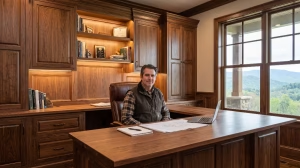
- The “Zoom Wall”: In the modern world, your background on a video call is your office. A virtual background is a poor substitute. We must intentionally design the “Zoom Wall”—the wall behind your desk. This is the new executive calling card. We design this wall with custom, built-in shelving, integrated accent lighting, and a curated display of books or art. It is designed to look professional, organized, and impressive on camera.
- Layout (Desk Placement): This home office often benefits from a more traditional, “power” layout. We place the desk in the center of the room, facing the door. This looks commanding on camera. However, this creates a major technical challenge: power and data. The only way to do this correctly is to install floor outlets for your power and Ethernet. This must be planned before the foundation is poured or the flooring is installed. You cannot have cords snaking across the floor to your desk.
- Acoustics: Second only to the therapist, the executive needs a quiet home office. You cannot have a dog barking, a blender running, or a child yelling during an important board meeting or sales call. We use the same techniques: a solid core door and sound-dampening insulation in the walls. A well-built home office for an executive provides a quiet “bubble” for important, high-stakes communication.
Building Your Home Office with Competence and Precision
Your home office is very likely one of the most-used rooms in your entire house. In many cases, you will spend more waking hours there than in your living room. Treating it as an afterthought, or as a simple room to be decorated, is a costly mistake. It costs you in lost productivity, daily frustration, and the simple discomfort of fighting a space that was not designed for you.
When you plan your home office around your specific profession before the first 2×4 is cut, you are making a long-term investment in your own work. You are ensuring the infrastructure, the layout, and the built-in functions serve you with precision for decades to come. That is the difference between a simple spare room and a true, professional-grade home office.