

The “Invisible” Foundation of Your Home
When you walk into a custom home in Johnson City or Kingsport, the first things that catch your eye are usually the visible finishes. You see the gleaming granite countertops, the wide-plank hardwood floors, and the custom cabinetry. These are the things that make a house feel like a home. But as has often been stated on this blog, we can tell you that some of the most critical parts of a modern home are the things you cannot see at all. One of these is the technology infrastructure hidden behind the drywall.
Think of this infrastructure as the “digital plumbing” of your house. Just as you would not want pipes that leak or clog after five years, you do not want technology wiring that becomes obsolete before you even finish unpacking. Many people believe that “wireless” means they do not need wires. This is a myth. A strong wireless network relies entirely on a strong wired backbone. If you rely only on Wi-Fi without the right cables in the walls, your expensive smart devices will struggle to connect.
Retrofitting, or adding new wires after a house is built, is messy and expensive. It involves cutting holes in your beautiful new drywall, which you likely painted, and patching them up again. It is far better to plan ahead. By investing in the right technology infrastructure now, you are not just building a house for today. You are building a home that will keep its value and livability for decades to come. Whether you are building in the rolling hills of Jonesborough or the city limits of Bristol, a future-proof home is a smart investment. It ensures your home works for you, not the other way around.
Video Version of this Article
Structured Wiring: The Copper & Glass Backbone
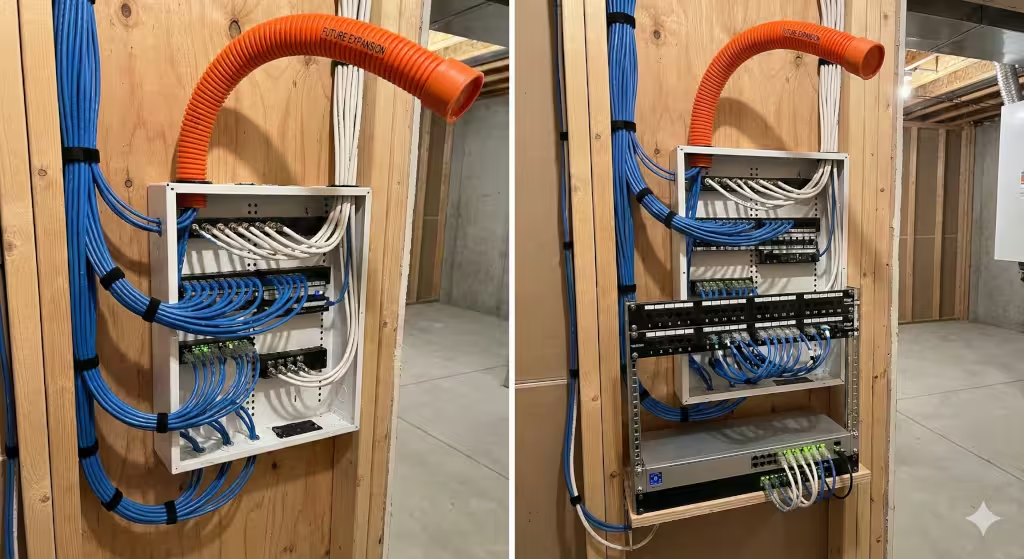
In the world of home building, we often talk about the “bones” of a house. Usually, this means the wood framing and the concrete foundation. But in 2025, your technology needs good bones too. This is where structured wiring comes in. Structured wiring is a bundle of heavy-duty cables that run from a central hub to every room in your house. It is the highway that carries all your data, video, and audio signals.
Why Old Cables Won’t Cut It
In the past, builders used a type of cable called CAT5e. This was fine for checking email ten years ago, but it is not enough for today’s technology. Today, we stream movies in 4K and 8K resolution. We have video calls for work that require high speeds. We have dozens of smart devices talking to each other at once.
To handle this load, you need CAT6a cable. This is the new standard for a modern custom home. CAT6a cable can handle speeds up to 10 Gigabits per second. That is ten times faster than the old standard. It is also shielded, which means it is protected from interference. This ensures your technology runs smoothly without buffering or lag. If you use older cable, you are building a bottleneck into your walls.
Fiber Optic Readiness
We are very lucky in the Tri-Cities area. Local providers like BrightRidge in Johnson City and Point Broadband in Kingsport are rolling out incredibly fast fiber internet. Some areas can even get speeds up to 10 Gigabits. To use these speeds, you need fiber optic capability in your home.
You should ask your builder to run a conduit, or a hollow tube, from the outside of your house to your central utility room. This allows the internet provider to pull their fiber optic cable directly into your technology hub. This direct connection ensures you get every bit of speed you pay for. It is a small detail that makes a huge difference in how your technology performs.
The Magic of the “Smurf Tube”
One of my favorite tricks in the building industry is something we call “smurf tube.” It is a blue or orange flexible plastic tube. It looks a bit like a vacuum cleaner hose. We install this tube inside your walls before the drywall goes up. We run it from your basement or utility room up to the attic, and also behind your main TV areas.
The tube stays empty at first. But five or ten years from now, when a new type of technology cable is invented, you will be ready. You can simply fish the new cable through the tube without cutting a single hole in your wall. It is the ultimate way to future-proof your home. It costs very little to install now, but it can save you thousands of dollars in labor and repairs later.
Networking: Beyond the ISP Router
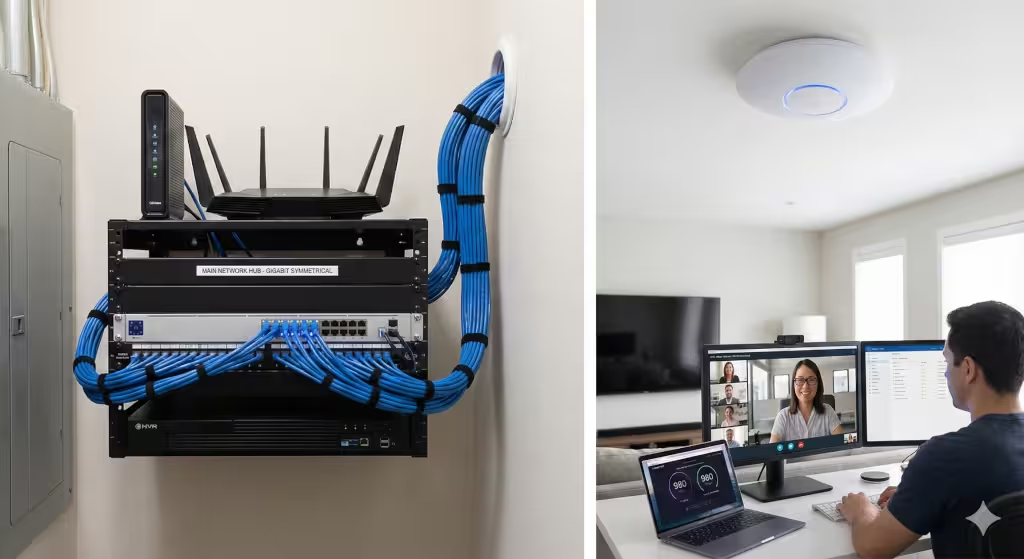
Most people rent a plastic router from their internet company and stick it on a shelf in the living room. Then they wonder why the Wi-Fi is slow in the master bedroom. For a custom home, this approach is not good enough. Your technology deserves a professional setup.
The Central Network Closet
Instead of having equipment scattered around the house, you should have a central network closet. This is a dedicated space for all your technology gear. It is usually located in a mechanical room, under the stairs, or in a conditioned basement area.
This closet houses your modem, your router, your switches, and your security recorder. It keeps the blinking lights and messy wires out of your living space. It also keeps the equipment cool and safe. When you organize your technology this way, it is much easier to fix problems if something goes wrong.
Hardwired Wireless Access Points
We all love Wi-Fi. But did you know the best Wi-Fi comes from wires? In a large home, a single router cannot cover every corner. You might be tempted to use “mesh” extenders that you plug into wall outlets. These are okay, but they often slow down your speed.
A better solution is to use Wireless Access Points, or WAPs. These are small devices that mount on your ceiling. They look like smoke detectors. You should run a CAT6a cable to the ceiling in central locations on every floor. These cables connect the WAPs back to your main technology closet.
This setup creates a “hardwired backhaul.” It means the WAPs talk to the main router through a cable, not through the air. This frees up the airwaves for your phones and laptops. It ensures that your Wi-Fi is fast and stable, no matter where you are in the house. In a hilly region like East Tennessee, where cell service can be spotty, having rock-solid Wi-Fi for calling is a safety necessity.
Symmetrical Gigabit Speeds
If you work from home, you need to understand upload speed. Most internet plans have fast download speeds but slow upload speeds. This was fine when we just watched Netflix. But now, when you are on a Zoom call, you are uploading video. If your upload speed is slow, your video will freeze.
Fiber internet in our area often offers “symmetrical” speeds. This means upload is just as fast as download. Your internal technology wiring must be able to handle this two-way traffic. By using CAT6a and high-quality networking gear, you ensure that your home office is just as powerful as a corporate office.
Smart Home Standards: The “Matter” Protocol
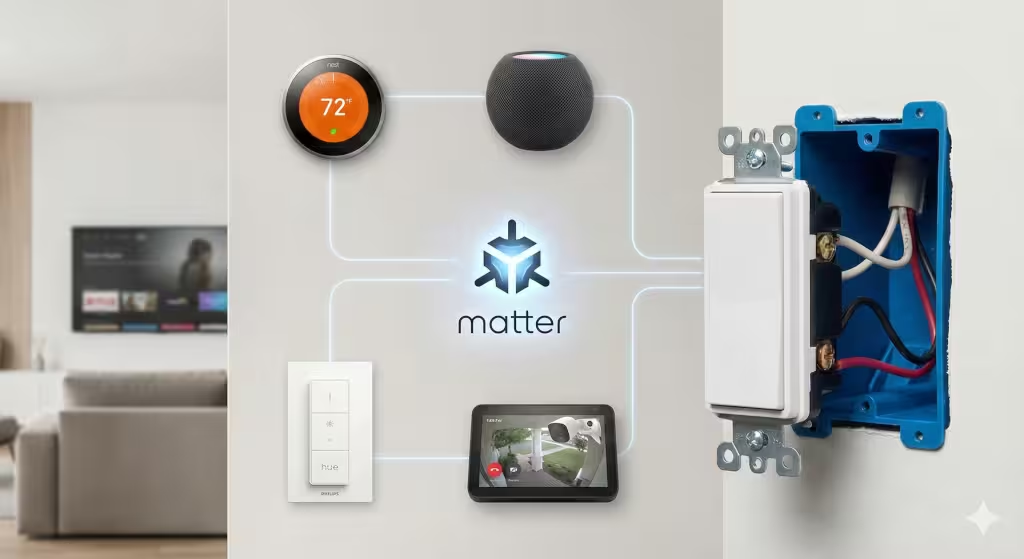
Smart home technology used to be confusing. You had to worry if a light bulb would work with your phone or if a lock would work with your voice speaker. In 2025, this problem is largely solved by a new standard called Matter.
What is Matter?
Matter is a language that allows smart devices from different companies to talk to each other. It means a Google thermostat can talk to an Apple light switch, and they can both talk to an Amazon lock. When you buy devices, you should look for the Matter logo. This ensures your technology will work together smoothly.
Electrical Planning for Smart Switches
Even if you do not want smart switches right now, you should wire your house for them. Smart switches require a little more power than old-fashioned switches. They need a “neutral wire” in the switch box.
In the past, electricians did not always put neutral wires in switch boxes. But for a modern custom home, it is mandatory. You must tell your builder that every switch box needs a neutral wire. This allows you to swap out a regular switch for a smart dimmer or keypad at any time.
You should also ask for “deep back boxes.” These are the plastic boxes inside the wall that hold the switch. Smart switches are often bulky because they are packed with technology chips. A deep box gives you enough room to fit the switch and the wires without crushing them.
Energy Management & Electrical Loads
Your home’s electrical system is the power plant for all your technology. As we move toward more electric cars and renewable energy, your electrical panel needs to be smarter and bigger.
EV Charging Pre-wire
Electric vehicles, or EVs, are becoming more common in the Tri-Cities. Even if you drive a gas truck or car today, the next owner of your home might drive an electric car. Or you might buy one five years from now.
You should run a heavy-duty wire to your garage for an EV charger. This is a 240-volt line, similar to what your dryer uses. You should ask for a 50-amp or 60-amp circuit. Even if you do not install the charger yet, having the wire and a blank plate on the wall is a huge selling point. It costs a few hundred dollars to do now, but it could cost thousands to add later if your panel is far away.
Solar and Battery Readiness
Many homeowners in Tennessee are interested in solar power to lower their bills. To make your home solar-ready, you need a conduit running from your main electrical panel up to the roof. This allows installers to run wires easily without ugly pipes on the side of your house.
You should also think about battery storage. Batteries can power your technology and lights during a storm outage. Designate a spot in your garage or utility room for a battery system. Ask your builder to run a conduit to that spot as well.
Smart Panels
The traditional breaker box is getting an upgrade. New “smart panels” from brands like Leviton or Span allow you to see exactly how much energy each circuit is using. You can check an app on your phone to see if you left the oven on, or to turn off the water heater when you are on vacation. This technology gives you total control over your home’s energy.
Security & Privacy: Hardwired is Safer
When it comes to security cameras, many people buy wireless cameras that run on batteries. These are easy to install, but they have flaws. The batteries die, often when you need them most. They can also miss action because they “sleep” to save power.
Power over Ethernet (PoE)
For a custom home, you want cameras that use Power over Ethernet, or PoE. These cameras connect with a single CAT6a cable. The cable carries both the video signal and the power. You never have to change a battery.
PoE cameras can record 24/7. They capture everything, not just short clips. Because they are wired, they do not clog up your Wi-Fi network. You should plan where you want cameras—front door, driveway, back porch—and run cables to those spots before the insulation is installed.
Local Storage vs. Cloud
Privacy is a big part of technology planning. Many cameras send your video to the “cloud,” which means it is stored on a company’s server. Many of my clients in the Tri-Cities prefer to keep their video private.
With wired cameras, you can use a Network Video Recorder (NVR). This is a black box in your tech closet that stores all your video on a hard drive inside your house. No one else can see it. It works even if the internet goes down. This is a secure, robust way to use security technology.
The Low-Voltage Walkthrough
There is a critical moment in home building called the “rough-in.” This is when the framing is done and the wires are run, but the drywall is not up yet. You should schedule a specific “low-voltage walkthrough” with your builder.
During this walk, do not just look at lights. Look for your data cables. Check that your TV spots have power and data. Check that your camera wires are in the right corners. Take pictures of every wall. This is your last chance to change or add technology wiring easily. Once the drywall is up, the window of opportunity closes.
Regional Considerations: The Tri-Cities Context
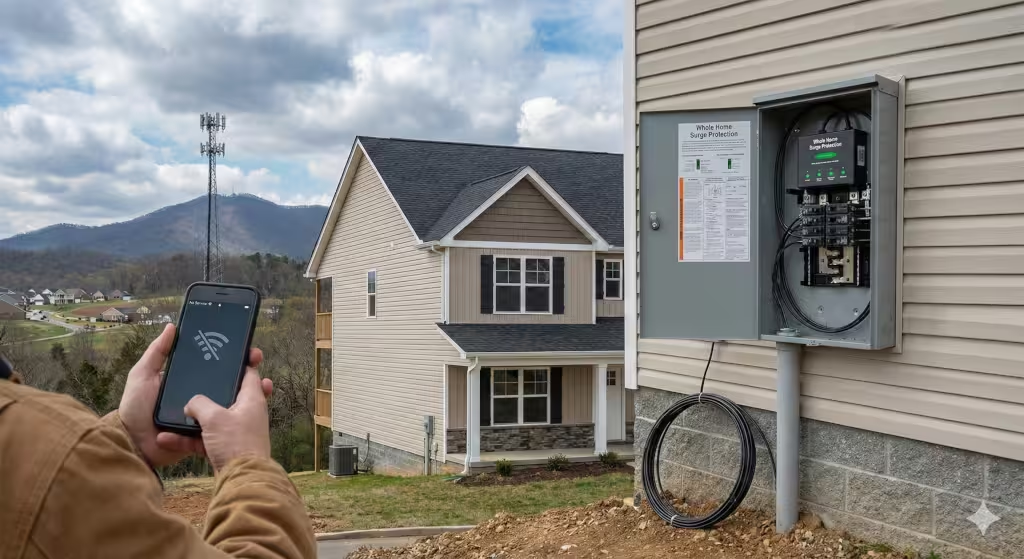
Building in East Tennessee presents unique challenges and opportunities for technology. Our geography is beautiful, but it can be tough on wireless signals. The limestone and clay in our soil, and the ridges and valleys, can block cell signals.
Topography and Signal
Because cell service can be weak in certain valleys or hollows, your home’s Wi-Fi calling feature becomes a lifeline. This makes your hardwired WAP system even more vital. You cannot rely on a cell tower that is hidden behind a ridge. Your home network must be the backup.
Lightning and Surge Protection
We get some fierce storms in the Tri-Cities, especially in the summer. Lightning strikes can fry sensitive technology in an instant. A simple power strip is not enough protection.
You should install a “whole-home surge protector” at your main breaker panel. This device absorbs big spikes of electricity before they can travel through your wires to your TVs and computers. It is a cheap insurance policy for thousands of dollars worth of technology.
Local Expertise
You do not have to figure this out alone. The Home Builders Association of Greater Kingsport, the Johnson City Area Homebuilders Association, and other local groups have lists of qualified low-voltage integrators. These are experts who specialize in home technology. They work alongside your electrician to ensure the data cables are handled correctly. Electricians are great at high voltage, but low voltage data cables are delicate. They need to be treated with care to work properly.
Conclusion
Future-proofing your home is the ultimate logical choice. It is not about buying the flashiest gadget that is popular this month. It is about building a robust infrastructure that can handle whatever technology the future brings.
We often get caught up in the emotional excitement of building. We dream about the paint colors and the fireplace stone. But the functionality of your home depends on the wires you cannot see.
Remember this rule of thumb: It costs about $50 to run a cable while the walls are open. It costs $500 or more to run that same cable after the walls are closed.
By following this guide, you are preparing your home for high-speed fiber from providers like BrightRidge. You are readying your garage for an electric car. You are ensuring your family can work, learn, and play without digital interruptions. You are building a home that is competent, precise, and ready for the future.