When you are having a video call on zoom, Google Meet, Microsoft Teams, or similar, first impressions are everything. We call it curb appeal. When a buyer pulls up to a house, they decide in seconds if they trust the builder. Today, that curb appeal has moved inside. When you hop on a Zoom or Teams call, your professional background is your new front porch. It is the first thing people see, and it tells a story about how much you care about the details. If your space is messy, people might think your work is messy too. But if you have a clean, sharp look, you build trust before you even say hello.
Our goal today is to help you find that perfect balance. We want a professional background that shows off your personality without making people stare at your laundry or your cat. We want you to look like the expert you are, with a setup that is as solid as a well-poured foundation.
The Psychology of the Digital First Impression
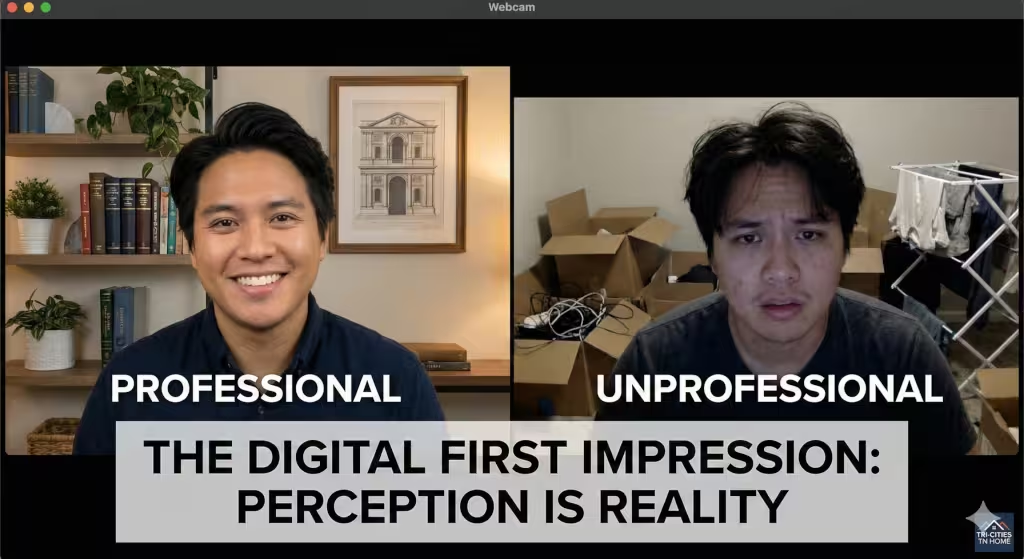
When we talk about a professional background, we are really talking about how people feel when they look at you. Think about walking into a bank. If the lobby is clean and the furniture is nice, you feel like your money is safe. If the walls are peeling and papers are everywhere, you might turn around and walk out. Your video call space works the same way.
Psychologists call this the “halo effect.” This means that if one thing about you looks good, people assume everything else about you is good too. If you have a professional background that looks organized, your boss or your clients will naturally think your mind is organized. It builds a sense of competence. You do not need to be a millionaire to look like a pro. You just need to show that you put in the effort.
The main goal here is to get rid of distractions. In a custom home, we hide the wires and the pipes because they are ugly and distracting. In your office, a professional background should keep the focus on your face and your words. You want people to listen to what you are saying, not try to read the titles of the books on your shelf or wonder why there is a treadmill in your kitchen.
Physical Design: Building Your Real-World Backdrop
To get a professional background that sticks, you need to start with anchor elements. In construction, an anchor holds things in place. In design, an anchor is the main thing people see behind you. A popular choice is a nice bookshelf. But don’t just jam it full of old magazines. Style it. Put a few books standing up, a few laying down, and maybe a nice award or a small piece of art.
Another great anchor is a simple, clean wall with one nice picture. If you choose art, make sure it is not too bright or weird. You want something that looks like it belongs in a high-end office. If you are in a bedroom, a nice folding screen can act as your anchor and hide your bed at the same time.
You also need to think about the rule of depth. This is a big secret in the building world. If you stand right against a flat wall, you look like you are in a mugshot. It makes the room feel small and cramped. To make your professional background look high-end, pull your desk away from the wall. If you can have three to five feet of space between your chair and the wall, it creates a 3D effect. This depth makes the video look more like a movie and less like a security camera.
Let’s talk about colors and textures. In the Tri-Cities, we love our wood and natural stone. Those textures work great on camera too. A professional background looks best with neutral colors. Think about soft grays, navy blue, or an off-white that isn’t too yellow. These colors make you stand out. If you wear a white shirt and have a white wall, you will look like a floating head. If you use matte finishes, you won’t have weird shiny spots reflecting off the wall.
I also highly suggest adding some plants. This is called biophilic design. It is a fancy way of saying that humans like nature. A small green plant on your desk or a taller one in the corner can make a professional background feel warm and inviting. It softens the look of all the computer gear and makes the space feel more alive.
The Pillar of Precision: Lighting for Video Calls
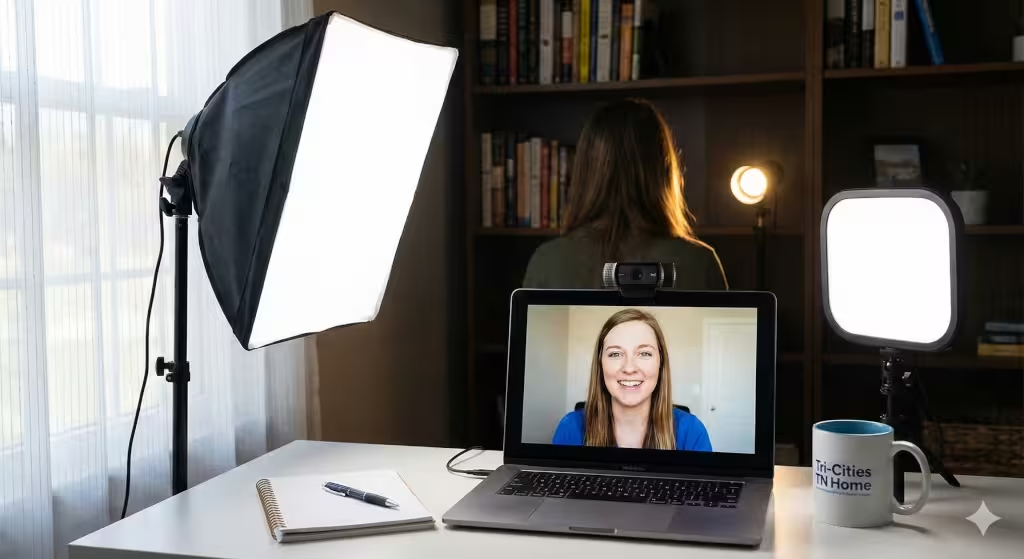
Lighting is the most important part of any professional background. You can have a ten-thousand-dollar office, but if the lighting is bad, you will look like you are calling from a cave. In the building industry, we use different lights for different jobs. For your video calls, you should try the three-point lighting system.
First, you have the key light. This is your main light. It should be in front of you but slightly to one side. It lights up your face so people can see your expressions. Second is the fill light. This goes on the other side of your face. It is softer than the key light and its job is to get rid of the dark shadows under your nose and eyes. Third is the backlight. This light sits behind you and points at your shoulders or the back of your head. It creates a little “rim” of light that separates you from your professional background. This prevents you from looking like you are blending into the wall.
If you have a window, use it! Natural light is beautiful, but it can be tricky. Always face the window. If the window is behind you, you will look like a dark shadow. If the sun is too bright and making you squint, use a sheer white curtain to spread the light out evenly.
For gear, you don’t need to spend a fortune. A simple ring light can do a lot of the work. If you want to step it up, LED panels are great because you can change how “warm” or “cool” the light is. A professional background usually looks best with “daylight” bulbs, which are around 5000K on the box. This keeps things looking crisp and clean.
Virtual and Hybrid Solutions
Sometimes, you just don’t have a good room to use. Maybe you are working from the dining room table or a spare closet. This is where virtual tools come in. You can use a digital professional background to hide the mess.
If you go this route, I suggest a green screen. You can buy a cheap one that clips onto your chair. A green screen helps the computer know exactly where you end and the background begins. Without it, your ears or hair might disappear when you move. It makes the digital professional background look much more real.
For those who work for a big company, a branded professional background is a smart move. You can have a digital image that shows the company logo and colors. Just keep it simple. If there is too much going on in the image, it becomes a distraction.
Another trick is the “blur” effect. Most video apps like Zoom have a button that blurs everything behind you. This is a great “middle ground” solution. It keeps your professional background looking clean without making it look like you are sitting in a fake cartoon office. It mimics an expensive camera lens and keeps the focus entirely on you.
Common Pitfalls: What to Avoid
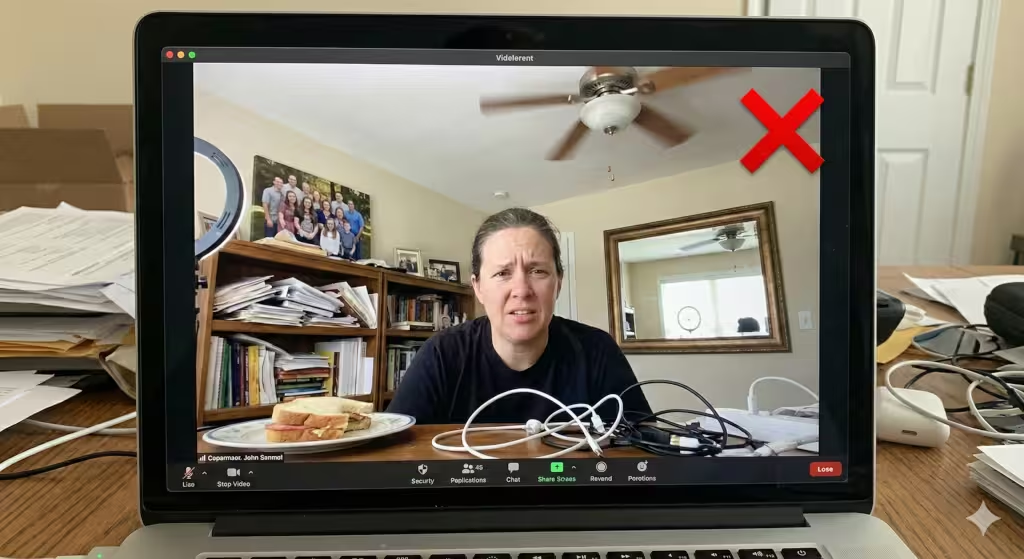
Even with a good plan, there are some common mistakes I see all the time. The first one is visual noise. This is just clutter. If you have a pile of mail, a half-eaten sandwich, or a bunch of tangled wires in the shot, it ruins the professional background. Clean your desk before every call.
Watch out for reflective surfaces too. If you have a picture frame with glass or a big mirror behind you, it will reflect your screen or your lights. This can be very distracting for the person watching you. It can even let them see things in your room that you didn’t want them to see.
One thing people in Tennessee often forget about in the summer is the ceiling fan. If you have a ceiling fan spinning right above your head in the video, it creates a flickering effect. This can actually give some people a headache! Try to keep the fan out of the frame or turn it off during the call.
Also, be careful with family photos. While it is nice to show you are a family person, too many personal photos can make the space feel less like an office and more like a living room. For a truly professional background, keep it to one or two nice framed shots at most.
Common Questions about Professional Backgrounds for Video Calls
A lot of people ask me, “How do I make my professional background look good for cheap?” My answer is always the same: clean up and light up. You can buy a five-dollar poster board or a simple curtain to hide a messy shelf. Good lighting is the biggest “cheap” upgrade you can make.
Another question is, “What is the best color for a professional background?” I always recommend a deep navy blue or a soft charcoal gray. These colors look expensive and they make almost any skin tone look healthy. Avoid bright yellow or neon colors, as they reflect weird light onto your face.
People also wonder how to hide a messy room quickly. If you are in a rush, use the blur feature on your camera or move your desk so your back is toward a corner. A corner is much easier to keep clean and decorated than a whole wall.
Tech Specs and Camera Angles
In construction, we always say “measure twice, cut once.” The same goes for your camera angle. You want your camera to be at eye level. If the camera is on your desk looking up, people are looking up your nose. That is not a professional background move! Use a few thick books or a monitor stand to raise your laptop up.
You should also learn about your “Field of View.” This is how much of the room your camera can see. Some cameras see a very wide area. If yours does, you need to make sure your professional background covers that whole space. You don’t want a beautiful setup in the middle and a messy kitchen showing on the far edges of the screen.
The Finished Build
Building a professional background is just like building a custom home. It takes a little planning, the right materials, and a focus on quality. When you put in the effort to make your space look good, you are telling the world that you are a professional who cares about excellence.
Take a look at your space today. Turn on your camera and look at it like a stranger would. Is it clean? Is the lighting good? Does it feel like an expert works there? If not, use these tips to start building. Remember, your office is more than just a place to sit. It is a tool to help you succeed.
An Example “Executive Oak & Stone” Video Background
Since we’re talking about building a look that lasts, just like a well-constructed home in Johnson City, the colors you choose for your professional background act as the primer for your entire digital presence. You want colors that look steady, trustworthy, and clean.
In the building trade, we call these “fail-safe” colors because they work in almost any light and don’t distract the eye. Here is a palette I’ve put together that balances the technical side of video with a friendly, professional feel.
The “Executive Oak & Stone” Color Palette
This palette is designed to create a sense of depth and authority. It uses cool tones to make you “pop” forward in the frame while incorporating natural textures to keep the space from feeling like a cold hospital room.
| Element | Color Name | Hex Code | Why It Works |
| Primary Wall | Hale Navy | #36454F | A deep navy is the gold standard for a professional background. It hides shadows and makes skin tones look warm and healthy. |
| Accent / Trim | Cloud White | #F2F2F2 | Use this for bookshelves or trim. It’s a soft white that won’t cause “light flare” on your webcam like a pure bleach-white would. |
| Warmth Layer | Natural Oak | #C19A6B | Bring this in through furniture or picture frames. It adds a “human” element and keeps the navy from feeling too heavy. |
| The “Pop” | Sage Green | #8A9A5B | This is your plant color. A bit of green in a professional background signals growth and calm. |
Tips for Applying This Palette
The 60-30-10 Rule: Use your primary wall color (the Navy) for 60% of what the camera sees. Use your furniture or trim color (the White/Oak) for 30%, and save your accent (the Green) for the last 10%—usually a single plant or a piece of art.
Avoid the “Vampire” Look: If you go with a dark wall like Hale Navy, make sure your key light is hitting your face. Without good light, a dark professional background can make the camera work too hard, which leads to a “grainy” or “fuzzy” video quality.
The Shirt Contrast: When you have a professional background with these colors, try to wear something that stands out. If your wall is navy, don’t wear a navy shirt. A light blue, grey, or even a soft burgundy will make you look like you were professionally styled.
Materials and Equipment for the Background
Building a professional background is just like finishing a house. You have the layout and the colors, but now you need the right tools and materials to make it all come together. I have picked out some of the best gear that fits our “Executive Oak & Stone” look. These items are like the high-end fixtures in a custom home, they are built to last and make everything else look better.
Master the Light: The Core of Your Professional Background
If you want a sharp professional background, you have to start with lighting. Even the best decor looks muddy if it is in the dark. For the three-point lighting system we talked about, I recommend using lights that let you change the brightness and the color. This helps you match the natural light coming through your window.
The Logitech Litra Glow is a fantastic choice for your key light. It uses special technology to give you a soft, glowing look that doesn’t create harsh shadows. It clips right onto your monitor, so it doesn’t take up any space on your desk. This is perfect for keeping your professional background clean and organized.
If you need more control, the Logitech G Litra Beam is a step up. It is a long, thin light that you can tilt and rotate. You can use two of these to handle your key light and your fill light. They are very bright but easy on the eyes, so you can stay on calls all day without getting a headache.
The Foundation: Natural Oak Desks
In our color palette, the natural oak desk is the piece that adds warmth. It feels solid and trustworthy, just like a well-built oak floor. When you are on camera, the top of your desk often shows in the bottom of the frame. A real wood texture makes your professional background look much more high-end than a cheap plastic or metal desk.
The Oakywood Classic Mid-Century Modern Desk is a beautiful piece of furniture. It is made from solid wood and has a timeless design. It fits perfectly into a professional background because it looks clean and sophisticated. If you need more storage, the Winchester Natural Oak Executive Desk is a larger option that feels very “boss-like” and has built-in spots to hide your messy wires.
The Backdrop: White Bookshelves for Contrast
To make our “Hale Navy” walls pop, we need some bright white bookshelves. These provide a clean grid for you to display your books and awards. In a professional background, you want shelves that look sturdy and deep. Thin, wobbly shelves look cheap on camera and can even lean over time.
The IKEA BRIMNES Bookcase is a classic choice. It is affordable, bright white, and has a very clean look. For a more “built-in” feel, you could go with the Realspace 5-Shelf Bookcase. It is tall and has decorative molding at the top, which adds a bit of architectural detail to your professional background.
Finishing Touches: Adding Sage Greenery
The last piece of our professional background is the “pop” of green. Plants make a room feel friendly and less like a cold office. Since most of us don’t have time to water plants every day, I suggest high-quality faux plants. They look exactly like the real thing on camera but never turn brown.
An olive tree is a very popular choice right now because it looks elegant and slim. The Sunnydaze Indoor Artificial Olive Tree is a great height to sit in the corner of your video frame. If you want something that sits on a shelf, a Snake Plant is a great choice because its tall, straight leaves look very modern and sharp in a professional background.
Choosing these specific items will turn your office into a space that looks like it was designed by a pro. You’ll have the lighting to look your best, the wood to feel grounded, and the white shelves to keep things bright.