


Building a house requires a blueprint. You would never pour concrete or frame a wall without knowing exactly where the load-bearing points are. Yet, many intelligent people, engineers, developers, and writers, throw a desk into a spare corner and call it a workspace. That is not how you build for success. For success, every part of that system needs to work together to support the load you put on it.
For programmers and writers, that load is mental. You engage in what we call “Deep Work.” This is the ability to focus without distraction on a cognitively demanding task. If your environment is fighting you, your work will suffer. Poor lighting causes eye strain. Bad ergonomics cause back pain. Clutter causes anxiety. These are structural failures in your environment.
In this article, we are going to engineer and conceptualize the best home office layout for a programmer or writer. We will look at ten specific criteria, from the position of your desk to the quality of the air you breathe. We will move beyond decoration and focus on function, precision, and competence. By the end, you will have a blueprint for a home office that acts as a tool to help you build your best work.
Site Selection: The Command Position and Spatial Dynamics
When developers look at land for a new custom home development in Tennessee, we look at the lay of the land. We check the drainage, the sunlight, and the access. You need to do the same thing when choosing where your home office goes inside your house.
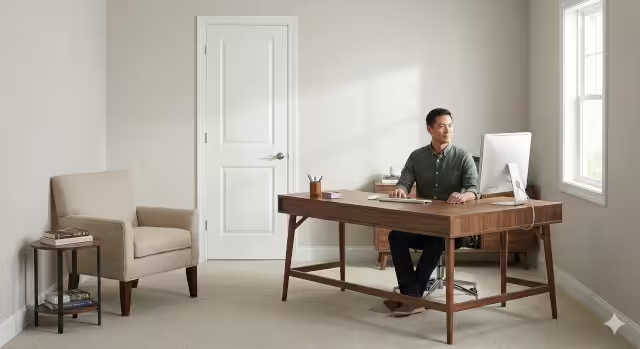
The most critical concept here is the “Command Position.” This is not some mystical idea. It is evolutionary biology. Humans are hardwired to feel anxious if they cannot see the entrance to a room. If your back is to the door, a small part of your brain is always on alert, wondering what is happening behind you. This drains your energy.
To fix this, place your desk so that you can see the door, but do not sit directly in line with it. This gives you a sense of control and safety. It allows your brain to relax so you can focus on writing code or drafting a chapter.
You also need to think about zoning. In a well-designed home office, you should separate the area where you produce work from the area where you consume information. Your desk is for production. That is where the keyboard and mouse live. If you have the space, set up a separate chair or a small couch for reading or reviewing documents. This physical separation helps your brain switch modes. When you sit at the desk, it is time to work. When you sit in the chair, it is time to think.
Finally, look at the traffic flow. You do not want your home office to be a hallway that family members use to get to the backyard or the laundry room. The space needs to be a destination, not a thoroughfare.
The Foundation: Ergonomic Engineering
In construction, if the foundation is cracked, the house will eventually fail. In your home office, your body is the foundation. If you ignore ergonomics, you will eventually deal with pain that stops you from working.
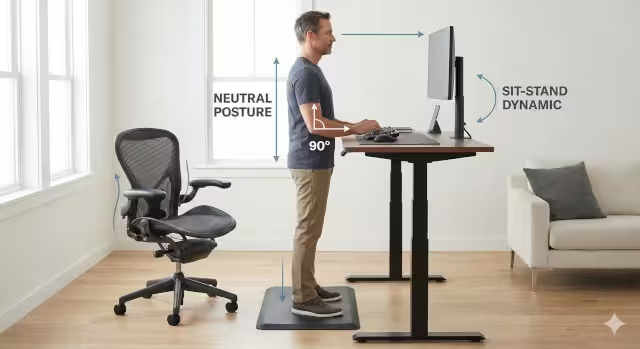
Let’s talk about the “Sit-Stand Dynamic.” The human body was not designed to sit in one position for eight hours a day. As a builder, I am on my feet a lot, but when I am drafting plans, I need to be careful. An electric standing desk is one of the best investments you can make for your home office. It allows you to change your posture throughout the day without stopping your work.
However, standing all day is hard on your knees. You need a balance. This is where a high-quality ergonomic chair comes in. Do not buy a cheap chair from a big box store. You need a chair that supports the natural curve of your spine. Look for a chair with adjustable lumbar support. You should also be able to adjust the seat depth so the edge of the chair does not cut off circulation to your legs.
Your feet should be flat on the floor, and your knees should be at a 90-degree angle. Your elbows should also be at a 90-degree angle when your hands are on the keyboard. This forms a neutral position that reduces stress on your joints. Think of this as framing your body correctly. If the angles are wrong, the structure weakens.
The Workbench: Desk Surface and Layout Strategy
A carpenter needs a solid workbench. Your desk is your workbench. The size and material of your desk matter more than you might think.
First, consider the surface area. You need enough space for your tools, but not so much space that you collect junk. I recommend a desk that is at least 30 inches deep. This depth is crucial for a home office because it allows you to push your monitor back to a comfortable viewing distance.
We organize the desk using “Zoned Reach.”
Primary Zone: This is the area within easy reach of your hands while your elbows are at your sides. Your keyboard and mouse go here. Nothing else should be in this zone.
Secondary Zone: This is the area you can reach by extending your arm. This is where you put your notebook, your coffee, or a reference book.
Tertiary Zone: This is the area you have to lean forward to reach. This is for lamps, plants, or file storage.
Keep your primary zone clear. Visual clutter in your immediate line of sight creates mental static. Also, pay attention to the material of the desk top. A glossy finish looks nice in a showroom, but in a home office, it reflects light and causes glare. A matte finish is much better for long hours of coding or writing.
Visual Systems: Monitor Configuration and Placement
Your eyes are your primary input device. Protecting them is essential. The way you set up your monitors depends on whether you are writing code or writing prose.
For programmers, vertical space is often more valuable than horizontal space. Being able to see a long block of code without scrolling helps you understand the logic better. Many developers in a home office prefer one vertical monitor for code and one horizontal monitor for testing or documentation.
For writers, focus is the goal. A single, high-quality monitor often works best. It forces you to look at one thing at a time.
Regardless of the number of screens, the placement rules are the same. The top third of your monitor screen should be at your eye level. If the screen is too low, you will hunch forward. This causes “text neck,” which can lead to headaches and long-term spine issues.
You also need to watch your focal depth. Your eyes have muscles called ciliary muscles. When you focus on something close, these muscles contract. If they stay contracted for hours, they get tired. Keep your monitor at least an arm’s length away (about 20 to 24 inches). This allows those muscles to relax slightly while you work in your home office.
Luminous Flux: Lighting Infrastructure
Lighting is often an afterthought, but it changes how you feel and how well you see. In the building industry, we talk about “lumens” (brightness) and “Kelvin” (color temperature).
You need a layered lighting strategy in your home office. Never rely on just a single overhead light. It creates harsh shadows and makes the room feel like an interrogation cell. Start with ambient lighting. This is soft, indirect light that bounces off the ceiling or walls. It raises the overall brightness of the room without hurting your eyes.
Next, add task lighting. This is usually a desk lamp. You want a lamp that you can move and adjust. Use it when you are reading paper documents or writing in a notebook.
Color temperature is huge. Light is measured in Kelvin (K).
Cool White (4000K – 5000K): This mimics daylight. It tells your brain to wake up and focus. This is great for the morning and early afternoon.
Warm White (2700K – 3000K): This is relaxing, sunset-colored light.
Smart bulbs are a great addition to a home office. You can program them to be cool and bright during the workday, and then fade to a warmer, dimmer light in the evening. This helps maintain your natural sleep cycle.
Finally, watch out for glare. Never put your monitor directly in front of a window. The contrast between the bright window and the screen will exhaust your eyes. Place your desk perpendicular to the window so the light comes from the side.
Acoustic Insulation and Control
Noise is the enemy of deep work. If you are trying to solve a complex algorithm or find the perfect word, hearing the washing machine or the television in the next room breaks your concentration.
It is well-known that mass stops sound. The biggest weak point in most rooms is the door. Most interior doors are hollow core. They are basically cardboard honeycombs wrapped in thin wood. They block almost no sound. If you own your home, replace your home office door with a “solid core” door. It is heavier and denser, and it makes a massive difference in sound isolation.
Inside the room, you need to stop sound from bouncing around. Hard surfaces like drywall and hardwood floors reflect sound, creating echoes. This makes you sound terrible on conference calls. Add soft materials to your home office. A thick area rug, heavy curtains, or even a fabric couch will absorb sound waves.
If you cannot change the construction of the room, use technology. A good pair of noise-canceling headphones acts like a portable wall. They allow you to block out the chaos of the household and stay in your zone.
Infrastructure: Power and Cable Management
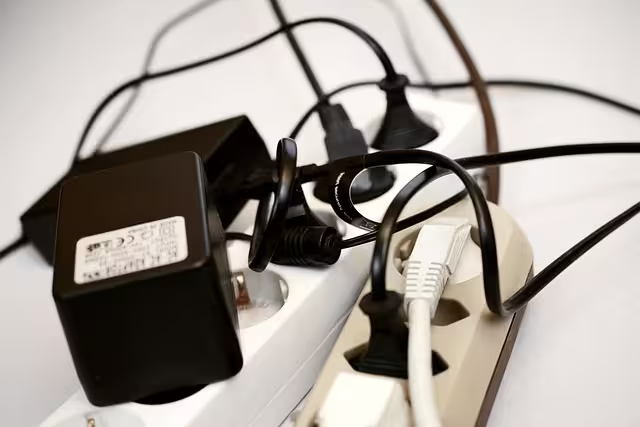
Nothing ruins the look and feel of a home office faster than a rat’s nest of cables. It looks messy, but it is also a mental drain. When you look at a mess, your brain registers it as a task that needs to be done. This uses up a small amount of your processing power.
We call this “The Clean Line Theory.” You want clean lines in the workspace of your home office. To achieve this, you need a plan for your cables.
First, mount a power strip to the underside of your desk. This is a game-changer. It means you have one single power cord going from the desk to the wall outlet. Everything else, your computer, monitors, lamp, and phone charger, plugs into the strip under the desk. This keeps the cables off the floor.
Use velcro ties or plastic channels (raceways) to bundle wires together. Run them along the legs of the desk so they are invisible. If you are building a new home or renovating, I always suggest installing floor outlets in the center of the room. This allows you to float your desk in the middle of the home office without having cords tripping people up.
Make sure your electrical circuit can handle the load. A high-end PC, multiple monitors, and a laser printer can draw a lot of power. In older homes, this might trip a breaker. If you are unsure, have an electrician check the load on that room’s circuit.
Hardware Integration
Your hardware is your toolkit. For a programmer or writer, the keyboard and mouse are the tools you touch all day.
Many professionals prefer mechanical keyboards.10 They provide tactile feedback, a “click” or a “bump”, when you press a key. This can actually help you type faster and with less force, which saves your fingers from fatigue. However, they can be loud, so keep that in mind if you share your workspace.
For your mouse, consider a vertical mouse. Standard mice force you to twist your forearm so your palm faces down. This puts stress on the two bones in your forearm. A vertical mouse allows you to hold it like you are shaking hands. This is a much more natural position and helps prevent carpal tunnel syndrome.
Connectivity is also part of the home office infrastructure. If you use a laptop, get a Thunderbolt dock or a USB-C hub. This allows you to plug in your monitors, keyboard, mouse, and internet with just one single cable connecting to your laptop. It makes it very easy to sit down and start working, or unplug and take your laptop to a job site or a coffee shop.
Environmental Quality and Biophilia

We often forget about the invisible parts of the room, like the air. But air quality has a direct impact on your brain. High levels of carbon dioxide (CO2) can make you feel tired and sluggish. If you sit in a small home office with the door closed for hours, CO2 levels rise as you breathe.
Ideally, your home office should have good ventilation. Open a window when the weather is nice. If you can’t, simply opening the door for a few minutes every hour helps exchange the air.
We also need to talk about “Biophilia.” This implies that humans have an innate desire to connect with nature. Working in a sterile box is depressing. Adding plants to your home office does two things. First, it visually softens the room. The organic shapes of leaves break up the straight lines of the monitors and the desk. Second, plants can help reduce stress.
Snake plants and Pothos are great choices because they are hard to kill and don’t need a lot of light. They add life to the space.
Temperature is the final factor. Most people work best when the room is between 68 and 72 degrees Fahrenheit. If you are too hot, you get sleepy. If you are too cold, you get distracted. A small fan or a space heater can help you micro-manage the climate in your workspace.
Maintenance and the “System Reset”
You can build the perfect home office, but you have to maintain it. Entropy is real. Things tend to get messy over time.
I recommend a daily “shutdown ritual.” When you are done working for the day, take five minutes to tidy up. Put your pens away. Throw away trash. Straighten your keyboard. This resets the room so that when you walk in the next morning, you are greeted by a clean slate. It is a psychological trick that helps you start the day with clarity.
People often ask me specific questions about their setups. Here are a few common ones:
“What is the best desk orientation for coding?” As I mentioned, facing the room (Command Position) is best. Never face a blank wall if you can avoid it; it stifles creativity.
“How much space do I need for a home office?” You can make it work in a small space, but you ideally want a minimum of 70 square feet to allow for a desk and a chair to move freely.
“Is a curved monitor better for writers?” It can be. A gentle curve can make the edges of the screen easier to see without turning your head, which reduces neck strain.
“How to soundproof a home office for cheap?” If you can’t replace the door, use weather stripping around the door frame. It seals the air gaps where sound leaks through.
Your home office is a living system. It should evolve as your needs change. Keep refining it. Keep improving it.